
Enterprise SaaS websites often treat crawl budget as a technical SEO detail that only matters at massive scale. That view leaves money on the table.
Once a site accumulates product pages, industry pages, feature comparisons, documentation, help center content, changelogs, blog archives, partner pages, localized variants, and parameterized URLs, crawl efficiency becomes a growth issue. If search engines spend time on duplicate or low-value URLs, important pages can wait longer to be crawled, refreshed, or indexed.
For B2B teams that depend on organic search and AI-driven discovery, that delay matters. High-intent pages need to be easy to find, easy to crawl, and clearly prioritized.
Why crawl budget matters for enterprise SaaS websites
Enterprise SaaS sites tend to grow in layers. The marketing site launches first. Then the docs center expands. Then support content, gated resources, webinar pages, product updates, integration templates, category filters, and regional pages pile on. Over time, the architecture becomes broader than the strategy behind it.
That is when crawl budget optimization stops being theoretical. Google’s guidance is clear: crawl budget is mostly a concern for large or complex websites, especially when many URLs are low-value, duplicative, or difficult to prioritize. If Googlebot keeps meeting thin, duplicate, expired, parameterized, or orphaned URLs, the pages that actually drive pipeline can lose attention.
This is not about trying to force Google to crawl more pages. It is about making the site more efficient so the pages that matter receive a larger share of crawl activity.
How Google defines crawl budget
Google defines crawl budget as the set of URLs Google can and wants to crawl. That definition has two parts: crawl capacity limit and crawl demand.
Pricing depends on scope and goals. Get a quote for your company on a 30-minute call.
Book a CallCrawl capacity limit reflects how much crawling a site can support without performance issues. Crawl demand reflects how much Google wants to crawl based on factors like URL popularity, freshness, and perceived importance. When teams talk about “increasing crawl budget,” they often miss the more practical goal: reduce wasted crawling so the demand and capacity available can be spent on the right URLs.
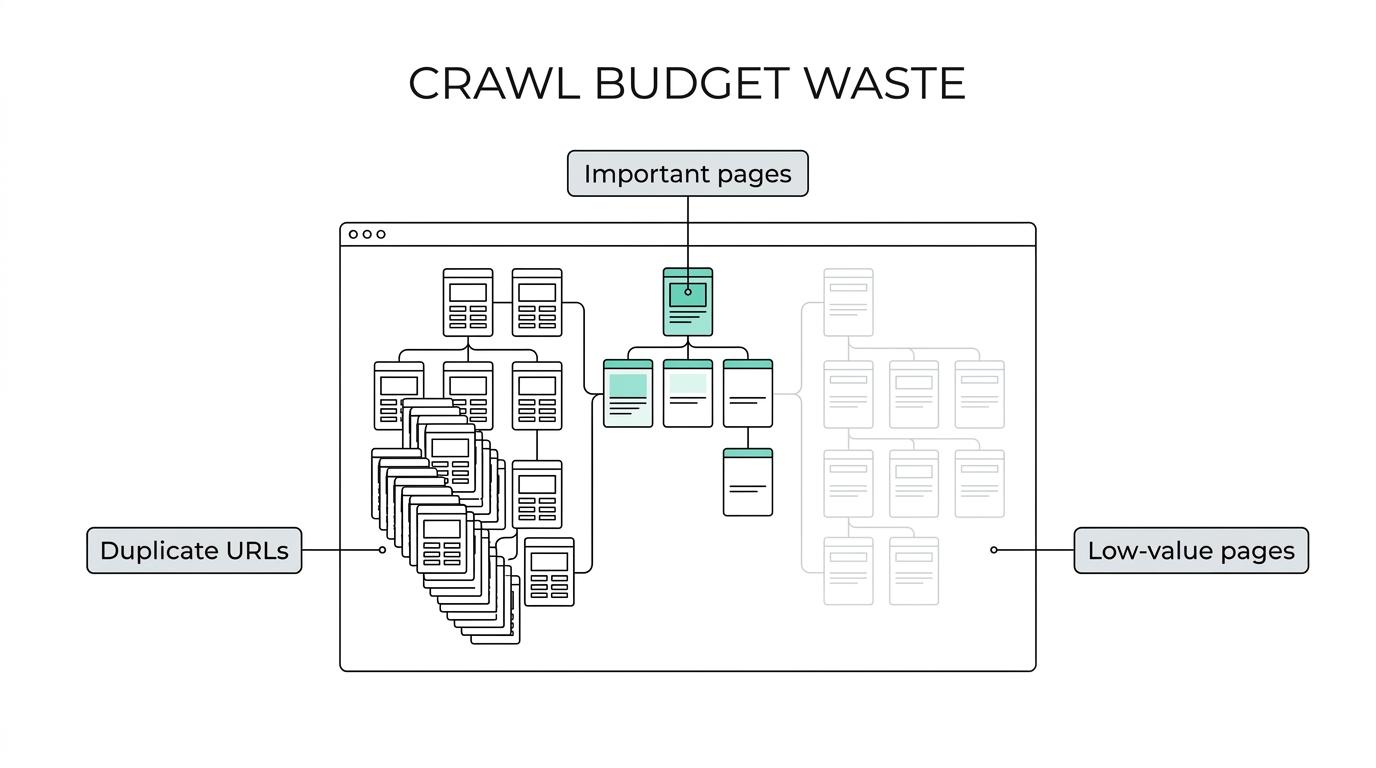
A large share of URLs sitting in Search Console under “Discovered - currently not indexed” can be a sign of crawl-budget friction. It does not always mean the site has only one problem, but it does signal that Google knows the URLs exist and is not moving through them efficiently enough to index them.
Enterprise SaaS URL patterns that waste crawl budget
Most crawl budget problems on SaaS sites come from URL multiplication, not from a lack of content.
A single content template can generate many variants through filters, tags, sort options, tracking parameters, PDF versions, printer-friendly views, duplicate docs paths, regional folders, or legacy redirects. The website may look organized to people while presenting a messy crawl surface to search engines.
Some of the most common patterns include:
- parameterized URLs
- faceted navigation
- session identifiers
- internal site search pages
- duplicate documentation paths
- old campaign landing pages
- tag and author archives with little value
- expired resource library pages
Google specifically calls out sorting and filtering functions on category pages as a common source of duplicate URLs. It also warns that faceted navigation and session identifiers often create duplicate content that should be managed carefully.
Faceted navigation and parameter URLs on SaaS content hubs
Many enterprise SaaS sites run content hubs or integration directories with filters for industry, use case, company size, feature, or platform. These filters are useful for users. They can be harmful when every filtered view creates a crawlable URL.
If those URLs are indexable, linked internally, and included in navigational patterns, Googlebot may spend a surprising amount of time crawling combinations that add little unique value. This is one of the fastest ways to burn crawl resources on a big site.
Duplicate documentation and help center URLs
Documentation systems often produce duplicate content through versioning, category paths, anchors, query parameters, alternate renderings, or migration leftovers. A product guide may live at multiple URLs with nearly identical content. Canonicalization becomes essential here.
Google describes canonicalization as choosing the representative URL from a set of duplicates. If the representative URL is not clear, search engines must spend more effort evaluating duplicates before they can settle on the page that should rank.
Low-value archives and stale landing pages
Enterprise SaaS sites also accumulate stale content that is not technically broken but no longer valuable. Webinar pages from years ago, thin event recaps, expired campaigns, low-traffic tag pages, and outdated release notes can all remain crawlable long after their business value disappears.
Unnecessary pages can reduce crawl activity on important pages and slow discovery of new or updated content. That tradeoff is often invisible until a site audit or log analysis makes it obvious.
Technical controls for crawl budget optimization
There is no single setting that fixes crawl budget. The work usually comes down to URL governance, internal linking discipline, and smarter crawl signals.
Google recommends using sitemaps, canonical URLs, and blocking or consolidating duplicate or unimportant URLs so crawling can focus on important pages. Each control solves a different part of the problem.
[markdown] | Crawl issue | Primary control | Why it helps | | --- | --- | --- | | Duplicate URLs for the same page | Canonical URL | Signals the preferred representative page | | Orphan but valuable pages | XML sitemap | Improves discovery on large or complex sites | | Thin or obsolete pages | Consolidate and redirect | Removes low-value URL overhead | | Faceted or filtered combinations | robots.txt or controlled linking | Reduces wasted crawling on non-priority URLs | | Legacy campaign pages | Prune or merge | Concentrates authority and crawl activity | | Mixed internal URL versions | Internal link cleanup | Reinforces the preferred crawl path | [/markdown]Sitemaps help search engines crawl websites more efficiently, especially when sites are large or complex. They are useful for pages that may not be easily discovered through normal internal linking. Still, a sitemap is a hint, not a guarantee. Listing a URL in a sitemap does not ensure it will be crawled or indexed.
Canonical tags are another strong signal, though they also are not commands in isolation. They work best when the canonical URL is backed by consistent internal links, clean redirects, and a clear site architecture. A self-contradictory setup weakens the signal.
Robots.txt can help keep crawlers away from unimportant or similar pages, and it can also protect servers from unnecessary crawler load. Yet teams should use it with precision. A blocked URL can still appear in search if other pages link to it. Blocking crawling is not the same as removing a URL from indexing consideration.
How to diagnose crawl budget problems on enterprise SaaS sites
The fastest way to mismanage crawl budget is to optimize blindly. Diagnosis should come before action.
Start with Search Console. Review index coverage, excluded states, and patterns in “Discovered - currently not indexed” and “Crawled - currently not indexed.” Then compare those patterns with sitemap coverage, canonical signals, and internal linking depth. Look for clusters, not isolated examples.
Log files add the missing operational picture. They show where Googlebot actually spends time, which matters more than assumptions made from a crawler alone.
A useful crawl-budget review often looks for:
- High crawler activity on low-value paths: filters, tags, search pages, or old campaigns
- Weak crawl frequency on money pages: product, solution, comparison, and integration URLs
- Excessive duplicate fetching: multiple parameter or path variants for the same content
- Slow refresh of updated assets: important pages not revisited quickly after meaningful updates
When these patterns show up together, the issue is rarely one page or one tag. It is usually a structural URL management problem.
Internal linking and information architecture for crawl demand
Crawl budget is not only about blocking waste. It is also about creating demand for the right pages.
Google’s crawl demand rises when URLs appear important, useful, and worth revisiting. That means your internal linking system matters. Revenue pages buried five clicks deep under noisy navigation often send the wrong priority signals, even if they are technically indexable.
Enterprise SaaS teams should think in content tiers. Product pages, solution pages, integration pages, competitor alternatives, pricing, documentation pillars, and high-intent resource pages should sit close to the core of the internal link graph. Thin archive pages, filter combinations, and expired content should not compete for the same crawl attention.
This is where a bottom-funnel-first content hierarchy pays off. When the most commercially meaningful pages receive the strongest internal link support, crawl demand tends to become more rational.
A practical crawl budget workflow for SaaS content operations
Crawl budget optimization works best when it becomes part of ongoing content operations instead of a one-time technical cleanup.
Every meaningful URL on the site should have a clear status and purpose. That discipline helps marketing, SEO, content, and engineering teams make faster decisions as the site grows.
A practical operating model is to assign every URL one of these actions:
- Keep as is: valuable, unique, internally supported, and performing its role
- Update: important but stale, thin, or underdeveloped
- Consolidate and redirect: overlapping with stronger pages
- Delete: low-value pages with no strategic reason to remain
This kind of classification prevents the slow buildup of crawl waste that often follows rapid publishing cycles, product launches, and CMS migrations.
It also creates a better handoff between SEO strategy and development. Engineers do not need vague requests about “fixing crawl budget.” They need a prioritized list of URL classes, rules, redirect requirements, canonical standards, and sitemap logic.
What enterprise teams should monitor after crawl budget changes
The work is not done when rules are deployed. Crawl budget optimization should be measured over time.
Monitor index coverage trends, sitemap-to-index alignment, crawl activity in log files, canonical selection, important page recrawl frequency, and the ratio of valuable indexed URLs to total crawlable URLs. These signals show whether the site is becoming cleaner or simply changing shape.
A strong monitoring rhythm usually tracks:
- Search Console excluded states by directory
- Googlebot hits by URL type
- orphan page counts
- parameter URL growth
- indexation rate for high-intent pages
- time to discovery for newly published pages
What you want to see is simple: less crawler attention wasted on duplicate and low-value URLs, faster discovery of important content, and steadier indexing of pages that support pipeline.
That outcome is achievable for large SaaS sites, even complicated ones. The websites that win here are not always the ones with the biggest engineering teams. They are the ones with clearer URL governance, cleaner site signals, and a sharper view of which pages deserve search visibility in the first place.